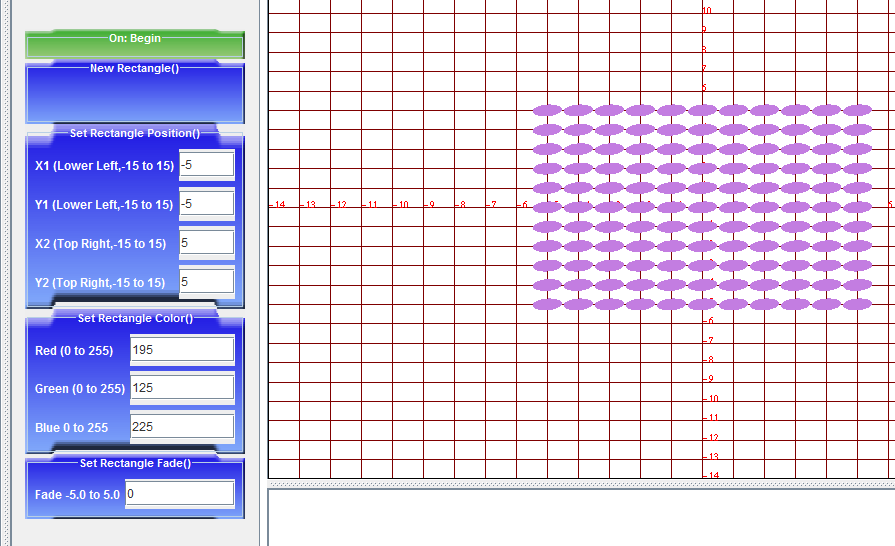
The script version of Rug Weaver no longer works. Having added image support there, I was surprised to find that the core no longer allows multiple instances of an object with different parameters. For example if you drag over a rectangle and fill in the parameters, and drag over a second Rectangle, the second Rectangle parameters are overriden by the first. Object Rug Weaver is coming along nicely, and I look forward to when core allows for creation of objects in the object pane.
Tuesday, July 27, 2010
Image support in rug weaver.
It has been a very interesting couple of days. I am about half way through adding image support in Object Rug Weaver... here is a clip...

The script version of Rug Weaver no longer works. Having added image support there, I was surprised to find that the core no longer allows multiple instances of an object with different parameters. For example if you drag over a rectangle and fill in the parameters, and drag over a second Rectangle, the second Rectangle parameters are overriden by the first. Object Rug Weaver is coming along nicely, and I look forward to when core allows for creation of objects in the object pane.
Tuesday, July 20, 2010
Object Rug Weaver
Rug Weaver now exists in two forms. There is the script based drawing tool form of Rug Weaver and now there is Object Rug Weaver. I think it is very exciting to have the program function as objects, because clearly the core is designed to work with objects. Here is a screen shot of the default script loaded in objectRW...

Here is a screenshot of the Event queue with an object listed, the object on the right, and the default Codelets on the left...

Next Steps...
Weave is not implemented at all currently, so that needs to happen. There will be another object specific weave codelet (like object position, object color) for weave. This will move weave back to the shape classes from its own class.
Hit tests, as it turns out, are not all implemented correctly so I need to figure these out.
In my opinion, it would be tremendously helpful...
If there were a code example to follow to access the object pane.
If there were a code example to follow to access/clear the codelets in the Event Queue pane.
Here is a screenshot of the Event queue with an object listed, the object on the right, and the default Codelets on the left...
Next Steps...
Weave is not implemented at all currently, so that needs to happen. There will be another object specific weave codelet (like object position, object color) for weave. This will move weave back to the shape classes from its own class.
Hit tests, as it turns out, are not all implemented correctly so I need to figure these out.
In my opinion, it would be tremendously helpful...
If there were a code example to follow to access the object pane.
If there were a code example to follow to access/clear the codelets in the Event Queue pane.
Wednesday, July 14, 2010
I have been working on debugging Rug Weaver while using the program to build reasonably complex images.
This symbol is called NKYINKYIM meaning "twisting" which is a symbol of initiative, dynamism and versatility in African symbols known as adinkra. Such symbols are commonly used in the west African country of Ghana...

In addition, I found this pattern while searching for the image above, however upon investigation it may not have any significance as far as adinkra is concerned...

The next steps are to investigate changing how the codelets choose color, so that RGB values can be automatically filled in from selecting a color using 'colorChooser', and to continue testing Rug Weaver with additional patterns.
My thanks to www.adinkra.org for their wonderful website that decodes traditional adinkra symbols. It will certainly be a source for additional inspiration in coding more of the adinkra symbols in the Rug Weaver tool.
This symbol is called NKYINKYIM meaning "twisting" which is a symbol of initiative, dynamism and versatility in African symbols known as adinkra. Such symbols are commonly used in the west African country of Ghana...
In addition, I found this pattern while searching for the image above, however upon investigation it may not have any significance as far as adinkra is concerned...
The next steps are to investigate changing how the codelets choose color, so that RGB values can be automatically filled in from selecting a color using 'colorChooser', and to continue testing Rug Weaver with additional patterns.
My thanks to www.adinkra.org for their wonderful website that decodes traditional adinkra symbols. It will certainly be a source for additional inspiration in coding more of the adinkra symbols in the Rug Weaver tool.
Wednesday, June 30, 2010
New Version posted
Rug Weaver has come a long way in the last few days. All of the codelets have been implemented including the Weave codelets. Everything also fades. The code has been massively cleaned up.
Each object is not reliably created and cleared, and the all null pointer exceptions have been handled.
The next step is to take care of the hit test code.
Here is the link...
http://www.cs.rpi.edu/~babbiw/RW/RWAppletLaunCS.htm
Each object is not reliably created and cleared, and the all null pointer exceptions have been handled.
The next step is to take care of the hit test code.
Here is the link...
http://www.cs.rpi.edu/~babbiw/RW/RWAppletLaunCS.htm
Saturday, June 19, 2010
RW deployed as Applet
Many issues were resolved this week. All of the drawing codelets were connected to the code that actually does the drawing and color issues were resolved.
The weave codelet setup is complete. Each drawing class reports the last object drawn to the Engine class for use by Weave. Weave now needs to take the information from the Engine and fill in the white space between the stiches in an appropriate way.
The Applet has been deployed at http://www.cs.rpi.edu/~babbiw/RW/RWAppletLaunCS.htm although the deployment needs some more tweaking.
This next week will be taken up with fully implementing the Weave codelet and tweaking the deployment.
Friday, June 11, 2010
I think this has been a very productive few days.
I have successfully compiled RW for the first time.
I have successfully implemented all of the codelets (yesterday), and sorted out the color value passing from the codelets to the draw methods (today).
I also figured out the onBegin() method to have it clear the previous drawings so old items are no longer present. (Thank you Jason for your direction).
The good news is that point, line, rectangle, and triangle work fine.
The bad news is that the iteration codelets are somewhat flaky. For example, if you draw a line iteration or a triangle iteration and then click on the drawn object all of the codelets disappear in the prgrammed pane and the Methods pane... poof! Nothing I've tried gets them back, you have to restart the applet.
I have committed my changes, so the next step is to deploy it on the CS server for everyone to tryout.
Wednesday, May 26, 2010
Subscribe to:
Posts (Atom)