Monday, February 27, 2012

Updating pCSDT file structures.

In order to make it easier to load the pCSDTs on to a local machine and not have any of the dependencies fail - and not have to change the .jnlp files... I have added local.jnlp to the root to the following tools...

BL Bead Loom local.jnlp added, tested, and deployed
CC Cornrow Curves local.jnlp added, tested, and deployed
GG Graphiti Grapher local.jnlp added, tested and deployed
KC Kente Cloth local.jnlp added, tested, and deployed
SB Skate Boarder local.jnlp added, tested, and deployed

created and uploaded a new web_deploy file and uploaded it to the repository.


Tuesday, February 7, 2012

February 7th, 2012

I have updated the tools so that the xml files should be compatible with the new community website.

I think I have arrived at a Kente Cloth simulation weave that more accurately represents the finished product with out adding too much overhead...

The Kente Cloth simulation is deployed here...

www.ccd.rpi.edu/eglash/csdt/pCSDT/KC/

Kente picture

Wednesday, January 11, 2012

Creation of Bead Loom and updates to Cornrows.

Copied and converted the Kente Cloth simulation pCSDT to Bead Loom simulation.

Cornrows simulation:

Removed 'Absolute Rotation'.

Removed Method 'Set Plait Image'. It would be nice that codelets loaded into the method panel in the order they appear in the .java source file. That way if the developer wanted a particular one to appear at the top (or bottom), it would be based on that order. (Need to look into that further).

pCSDT Bead Loom is now deployed here.


Bead Loom


Tuesday, October 11, 2011

Work for week 10/11


Deployment issues with both Cornrow Curves and Kente Cloth have been worked out and the new applets with the revised goal images are now deployed.

I have also been working on additional testing and code optimization for Kente Cloth.

Kente Cloth, complete with goal images and current text is available here.

A culture neutral version of Kente Cloth has been deployed here.

The latest version of Cornrow Curves is available here.

In addition, I have made a start in coloring the tabs.

Wednesday, October 5, 2011


1) Debugged Kente cloth application.

2) worked on goal image panel to make the images consistently load in a 'same size' button label.

3) Updated .html formats in Kente and CC to be consistent.

Tuesday, September 13, 2011

Work for week ending September 14

The Goal images panel is almost complete. When it loads, it places 4 goal images per page along with an editor pane that shows the HTML text associated with the image. I have added a scrollbar and set the goalImages pane to an initial size equivalent to the Applet. I think this is suitable for small screens especially, that when the panel loads it is navigable.

Previous accomplishments that did not get blogged about include...
Change 'Properties' to 'Sensing'.
Change 'Basic' to 'Starting Values'.
Prioritize order of sensing and codelets.

Goal images panel will be complete and deployed shortly, it is still in the debugging stage.


Before Selection.

After Selection

Tuesday, August 2, 2011

Work for week 7/31 - 8/6

Made changes to the demo scripts for CC as requested by Ron, and redeployed the applet to the ccd server.


Image1


KC:

Changed codelet goto x,y into Set x and Set y. This will allow changing the individual values of x or y without affecting the other value.

Exposed both x and y in the properties pane for use in building scripts.

Constructed sample Kente Cloth script.

Kente

Redepoyed applet onto ccd server.


Sunday, July 24, 2011

Work for week 7/24 - 7/30

Cornrows Demo

Cornrows...

Fixed initial plate angle, changes in the properties panel are now immediately reflected on the screen.

Changed drawing order of plaits so that the initial plait is drawn first which may result in it's being covered by subsequently drawn objects, but intuitively still makes sense. When changes are made, for which the initial plait needs to be seen, the screen clears revealing it anyway.

Scrollbar now seems to consistently appear when the script grows longer than the panel.

Deployed changes to Cornrows.

Kente Cloth...

Implemented translateX and translateY, removed code left from Cornrows that doesn't apply.

Implemented automatically drawing the weave shapes.

KC is deployed (finally) here...

www.ccd.rpi.edu/eglash/csdt/pCSDT/KC

KCdeploy

Tuesday, July 19, 2011

Kente Cloth

I have been working on converting Cornrows to Kente Cloth. The conversion is complete, the only thing remaining is to implement new Demo scripts. Once that is complete, I'll deploy it on the ccd server for people to try.

Some design considerations...

I like the 'Translate' by percentage codelets as opposed to 'Move by' an integer amount.

Weave is completely missing, and could be implemented instead by 'Translate' up/down left/right by 50 percent.


KC071911

Tuesday, June 14, 2011

Work for week 6/14/2011

1. Consulted with Eddie on how to fix Textures - now all work as expected.

2. Deployed latest version of CC on ccd.rpi.edu server.

3. Revising RugWeaver (on going) to use as Kente Cloth simulation.

Triangle test

Tuesday, June 7, 2011

Work for week 6/7/2011

1. Figured out textures and made them persistent at the plait level.

2. Fixed reset so that it works as expected.

3. Fixed x,y display so that it shows the correct coordinates.

Test


4. made a start on updating rug weaver.


Tuesday, February 22, 2011

Cornrow Curves


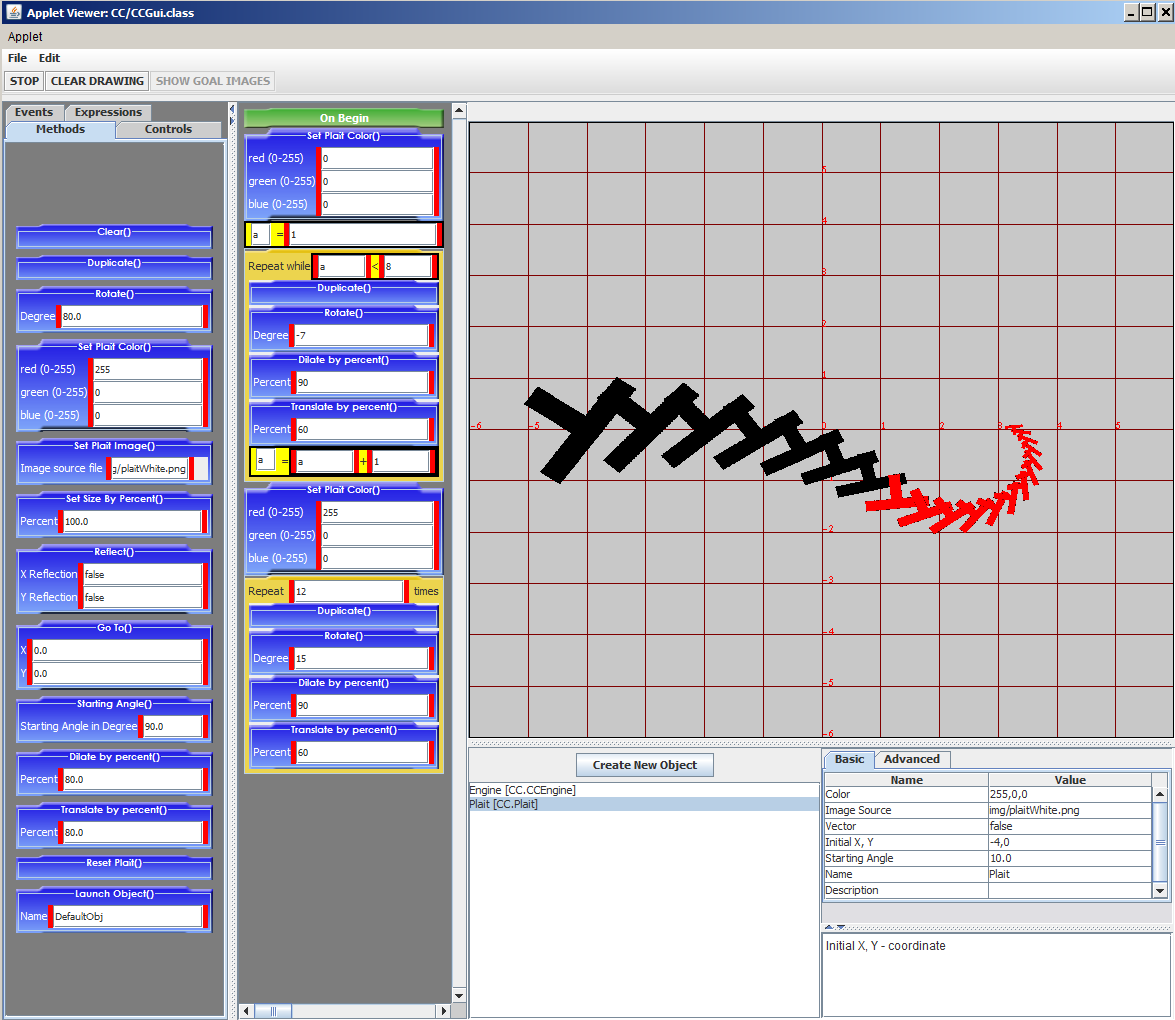
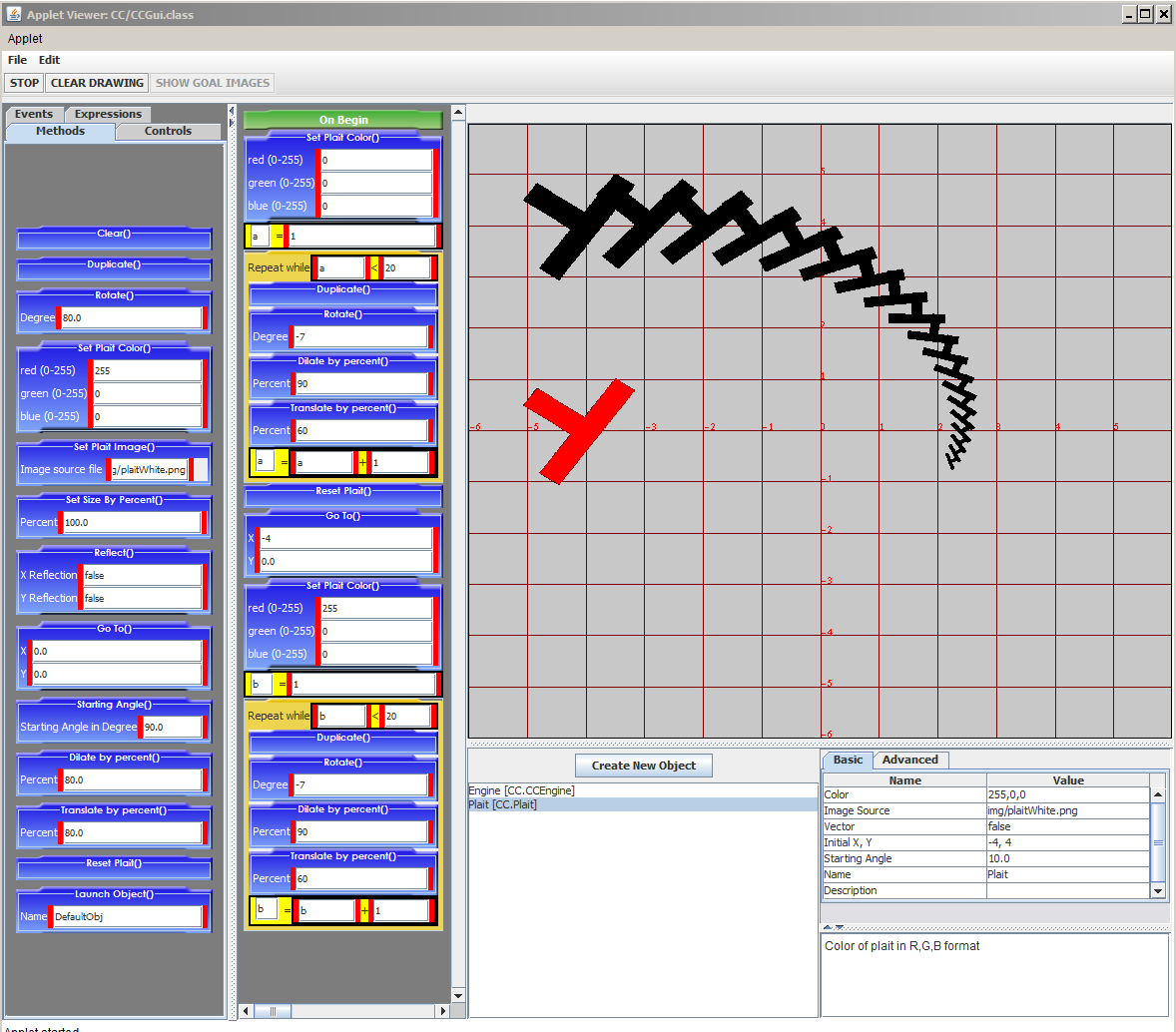
Above is a screen clipping that shows the programmatic creation of two plait braids within in the same object. The reset plait codelet resets the values to the default image, GOTO places that image at another location on the screen and then the iteration draws the second braid.


This screen clipping shows the creation of a braid that contains a change to the rotation value which makes the braid change direction.


This construction, however did not work and I see no reason for this.

In addition I tidied the code that occurs on 'reset' so that the stored values are consistent with the codelet values when the code runs again. For example, the color value would be the last used color when it should really be the original color value determined in the properties panel.

In addition I have updated the validation code for the properties panel values to be consistent with Skateboarder.

Thursday, January 27, 2011

Cornrow Curvew Continued


1) Remove 'start braiding' codelet
Start braiding codelet has been replaced with the properties listed in the properties panel and changes are reflected in the behavior of the program.

2) Implement xy reflection codelet
Already done.

3) Values showing in properties panel
Done in number 1 above.

4) Vector on and off toggle w/ default of false
Done.

5) Grid can now be toggled on and off with the default set to on.

6) You can now set the background color - I have dimmed the background from bright white (255, 255, 255) to (200, 200, 200). I think it's a little less straining on the eye.

7) Default values have been implemented in all codelets.

8) Adjusted the default values for the default script.
9) Changed the screen size so that when the applet starts the Cartesian gird appears as square - reducing the distortion on the Plait.
10) Changed the Reflection codelet from using 0 = false and 1 = true to just false and true with false being the default value.

Monday, January 24, 2011

Cornrow Curves

The result of clicking 'Begin' with three objects defined.

The result of clicking stop and Clear Drawing.

Fixed default script so that it shows properly when the program starts. Reworked start up script so that it incorporates the 'Repeat while' iterative control. Working on class attributes so that each instance of the class retains its own values, for example the color attribute. I think this is fixed now, with different braids retaining the different colors that were set for them.

I saved the .xml file, however the applet froze when I 'opened' it.

I have adjusted the code so that when you click 'clear drawing' the original plaits show in their original position. Previously, the last plait drawn remained on the screen. The starting position makes more sense I think. CC needs additional debugging and I am happy to continue working through that.

FQ and MG have both been updated with the new core and both have had their default scripts updated so that they work in the new format.

Sunday, November 14, 2010

RugWeaver is deployed.


The last couple of days have been extremely productive in bringing RugWeaver to a usable state. All of the classes have been rewritten and all of the non-iterative shapes can now be used with the iteration codelets. The two pictures show the RugWeaver Applet running with the default script executed. The first shows a stamping of rectangles that get progressively lighter, where the Pattern object is selected (red boxes around purple circles). The second shows the applet running the default script with the grid codelet being used to turn off the coordinate grid.

It is very exciting to see the program finally in a usable state. I look forward to receiving feedback from the students who use it!
The deployment is available here.

Monday, October 25, 2010

Rug Weaver almost there...


Rug Weaver is nearly complete in terms of being a drawing program. I have added in functionality for drawing triangles, triangular iteration, linear iteration, and the needle class which replaces lines, points and rectangles. I just noticed that the needle class needs a 'fade' codelet, and I know I have to play with the hit tests to make sure that they all work. The rest of the program as described works great. The image above was created interactively, demonstrating each of the shapes, with no complaints from the software. I also greatly cleaned up the code and deleted all files that are no longer used!

Sunday, October 17, 2010

Programmable Rug Weaver


The programmable version of RugWeaver is on it's way. I have converted the classes to be just 'Needle', and 'Icon'. Icon is transparent to the user and does the work of drawing the individual shapes on the canvas for 'Needle'. The picture shows Rug Weaver after programmatically creating and 'Begin'ing a rectangle.

I have noticed that the Control codelets have difficulty in certain areas. For example, if you look where the codelet box 'Move Left 1()' is, it was extremely difficult to get that codelet in that spot. That is also where I would have put 'Move Down 1()' however I could not get the 'green bar' to insert it there once the 'Move Left 1' was in. Notice that I have used a 'Repeat While' with a nested 'Repeat N', very nice to have iteration working so well!

It of course is no where near perfect, however it is very satisfying to have the program create a shape in the way it was intended to.

Tuesday, October 5, 2010

Files and Mantis

This is sort of a catch up post for all of the things that have been happening in the past few weeks.

The prototype applets have all been loaded onto the ccd.rpi.edu server. They all consistently work on Windows 32, 64, and Linux. On mac they seem to load only via the .jnlp file link, though this also seems to depend on the mac used to launch the software.

Skate Border
Graffiti Grapher
Freedom Quilt
Cornrow Curves
Mangbetu
Rug Weaver

I have been reading on customizing the Mantis software installation that we will be using as a bug tracker application. I've added some well known feature requests to the bug tracker software that are currently being worked on. I think that the mantis software offers a great opportunity to help keep the software development effort organized.

Mantis is available here.

In my travels, I have also been looking up information about snapshots for the csdt tools. Adding the ability to take a picture will allow the kids to create artifacts to be posted on the community site without complicating the process of doing so too much. It would really be nice to record a motion picture for the simulation tools, but the logistics of that definitely still need to be worked out.

Tuesday, August 24, 2010

It has been a pleasure working with the other developers this summer. All of the CSDT tools have come so far in such a short time. Here is an image of the Rug Weaver tool with my attempt at a Kente pattern that I found online...


Eddie has made really great progress on the outstanding Core issues. I am working at becoming a greater help to him, as I have been reading quite a lot to improve my java skills, I aspire to be as competent as he is someday. I have started to rethink how Rug Weaver could be reworked using iteration, although that code is not far enough along to demo at this point.

I look forward to continuing my work on these projects this fall.

Tuesday, August 10, 2010

Over the last few work periods, I have spent a fair amount of time figuring out textures. Along the way I have discovered that my implementation is correct (or at least seems to reliably work) except when the applet window is dragged to be bigger than when it is first drawn to the screen. Initially thought to be a flaw in my implementation, I now suspect that the code that responds to the viewport listener resize event is not quite correct.

I have started working on bounding boxes for the various shapes available in rug weaver. Point and Rectangle are done, Line needs to be figured out for diagonal drawings, Triangle is mostly done but needs to respond differently depending on the orientation of the triangle. So this is still a work in progress. Here is an image showing the bounding box drawn about the triangle as that is the selected object in the picture.


I need to finish up the bounding box implementations - figuring out orientation for Triangles, and deciding how the irregular shapes should be bound.

I have also updated the saved xml files to work with the new version of rug Weaver, and I have implemented all codelets with default values.

I also think that the random naming convention for objects needs to change. Something meaning full like 'Object_1' for the first object created etc. is more meaningful than the current random string.